


Microsoft Dynamics 365 Business Central Online (SaaS) is a cloud-based ERP software solution for small and medium-sized organisations. Launched in April 2018, it has been used by more than 30,000 customers in service, manufacturing, retail, healthcare, hospitality, transportation and logistics, finance, and dozens of other industries. It is a mature, robust solution that makes modern and complex business processes manageable with security, scalability, performance, flexibility and high availability.
Business Central Online as a cloud service consists of several microservices running on the Microsoft Azure cloud ecosystem. It is based on leading technologies such as Azure SQL, React, TypeScript, .NET Core, Azure OpenAI, Microsoft Entra, Azure Function, Container, Load Balancer, Virtual Machine Scale Set, Cosmos DB, Key Vault, Service Bus, Traffic Manages, SignalR, Web Socket and many more.
Global availability
Business Central Online currently runs globally in over 170 countries/regions and is available in 21 Microsoft Azure regions.
Trust, security and compliance
Service reliability can be viewed continuously in independent audit reports related to Microsoft's cloud services. On this page you can find information about compliance with data protection standards and regulatory requirements.
E.g:
- International Organization for Standardization (ISO)
- Service Organization Controls (SOC)
- International data protection standards
You can find logging and certifications for example ISO27001, ISO27018 or SOC 2 Type II reports.
Business Continuity and Disaster Recovery (BCDR)
The architecture and administration functions of Business Central Online provide continuous access to critical business data and processes. Automatic backups, built-in redundancy and high availability protect data and make it available during and after disruptive events. Business Central has proactive BCDR strategies, processes and technologies to minimize downtime and preserve important data.
Business Central Online guarantees 99.9% uptime in a paid, productive environment with the right to financial compensation if the service fails to deliver on this promise. Historical data shows that Business Central Online is able to consistently maintain this level of availability.
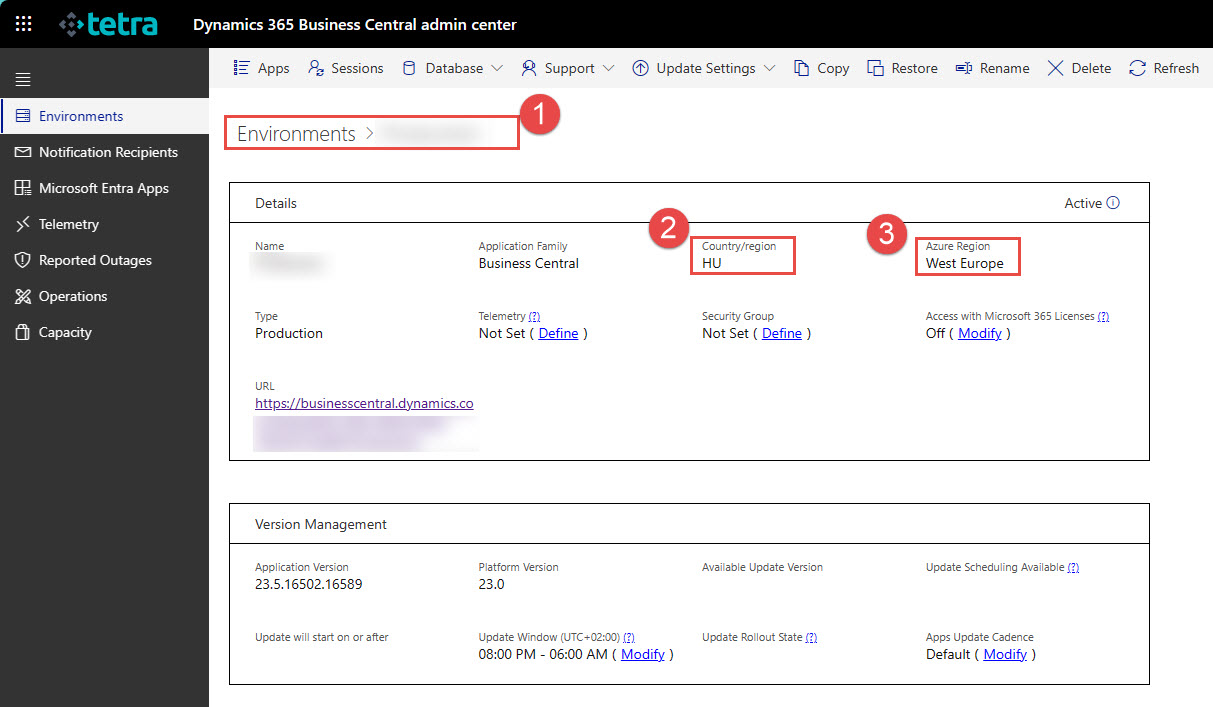
Business Central uses Azure's cloud-based platform for robust business continuity back-end processes that protect mission-critical workloads from disruptions. Azure's global network of regions keeps data close to the geographic location and provides options for data recovery in another region. Data is available even in the event of regional outages or disruptions. For more information about Azure regions, visit Azure geographies.
Administrators can search for the Azure region in their environment in the Business Central admin center.
Database and backups
Business Central online environments use the Azure SQL database.
Azure SQL Database, Microsoft's cloud-based relational database service, is the best service for Business Central transactional workloads. Azure SQL Database runs on the latest stable version and patched operating system of the current SQL Server database engine with 99.99% availability.
Behind the scenes, Azure SQL Database provides the following benefits to Business Central: high availability, rich business continuity and disaster recovery options, local and regional redundancy, backup and restore options, advanced performance analytics and tuning capabilities, schema management, efficient resource utilization, dynamic scalability features for fluctuating workloads, robust security protocols to protect sensitive data, and more. To learn more about how Azure SQL Database keeps workloads running smoothly, see High availability for Azure SQL Database.
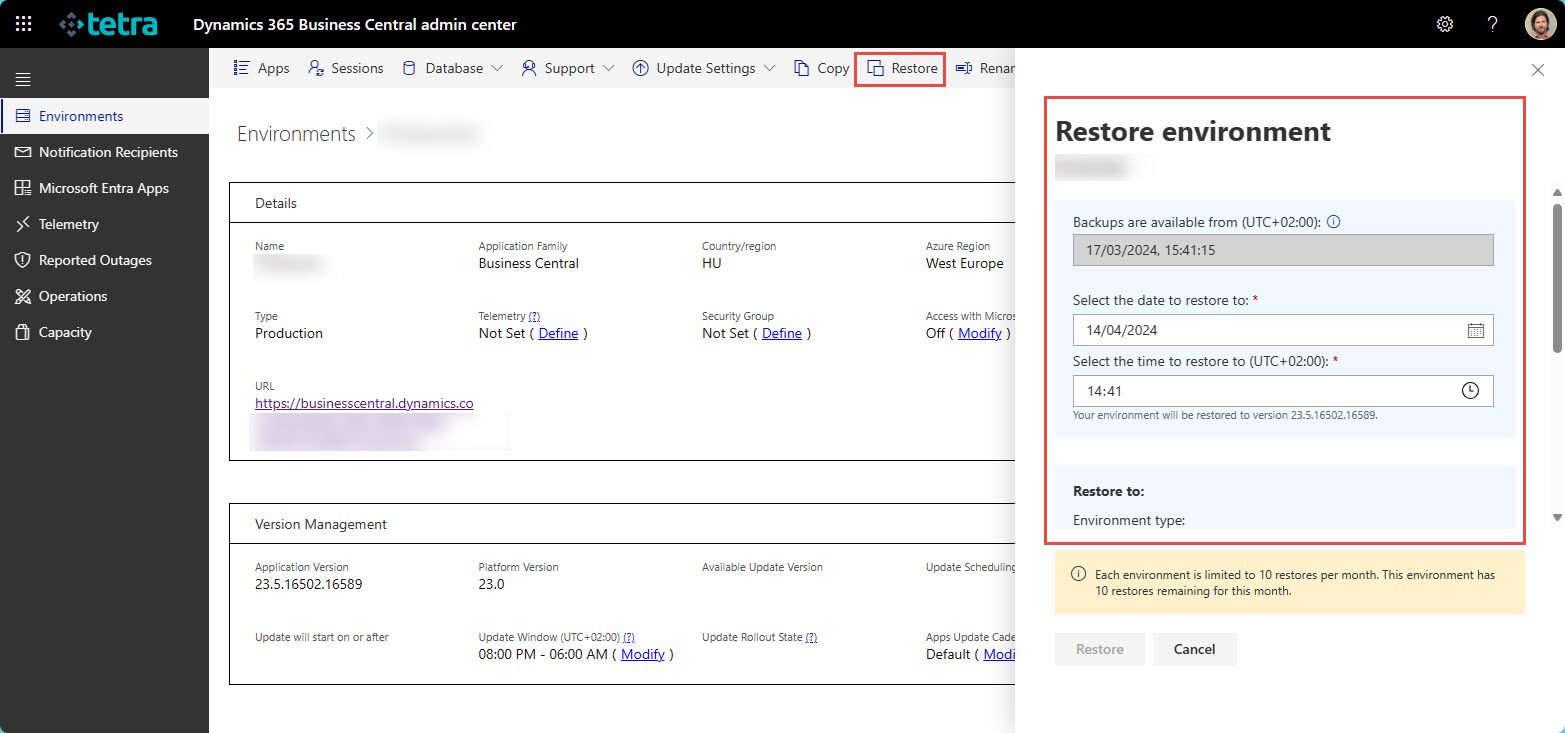
Azure SQL Database Business Central protects production and test environments by creating automatic backups that are retained for 28 days. System administrators can restore the environment to any given time in the last 28 days using the Céges central control center. To learn more about restoring your environment, see Restore your environment in the Control Center.
Administrators can also use the Business Central control center to recover deleted production or test environments within 14 days of their deletion. To learn more about recovering deleted environments, see Recovering an environment.
High availability through geographic redundancy
All Business Central environments are also protected by automatic geo-redundant backups. If a region experiences a complete outage, Azure restores data from a backup in another Azure region within the same Azure geography. Although rare, restoring data to another Azure region is possible if necessary and a standard part of internal audits and disaster recovery practices. For more information about backups, see Automatic backups for Azure SQL Database.
Azure Availability Zones provide additional flexibility by offering physically separate data centers within an Azure region. Distributing resources across multiple Availability Zones provides high availability for Business Central compute and storage resources. Local faults in one or more zones or during scheduled maintenance do not affect the tenants of the available zones. Other tenants are automatically redirected to resources in available zones in the same region. This setting is enabled in all Business Central production environments with a paid Business Central subscription.
Business Central also has built-in redundancy, auto-scaling, and auto-load balancing capabilities. In order to remain available if one or more processing threads fail, Business Central runs on multiple threads. Business Central supports in-flight updates and automatic operating system updates so you can apply patches, security updates, or new platform versions without downtime. Processing threads are always up-to-date and secure, reducing vulnerability to threats and service outages.
Service Level Agreements (SLA)
The Business Central online service is subject to the Modern Lifecycle Policy. The terms of the service provider agreement are described in the document that can be downloaded from the Service Level Agreements for Microsoft Online Services section of the Licensing Terms page.
Service updates
Business Central online is a service consisting of a platform and business functions maintained by Microsoft. Many Microsoft partners provide additional business functionality, for example to meet specific industry or localization needs.
New features are released in release waves consisting of one major update and monthly minor updates. Critical fixes are released as soon as possible after they have been tested and verified in Microsoft's secure staging environment.
Major updates are usually released twice a year, in April and October. Minor updates are released every month. An overview of release plans can be found at https://aka.ms/BCReleasePlan.
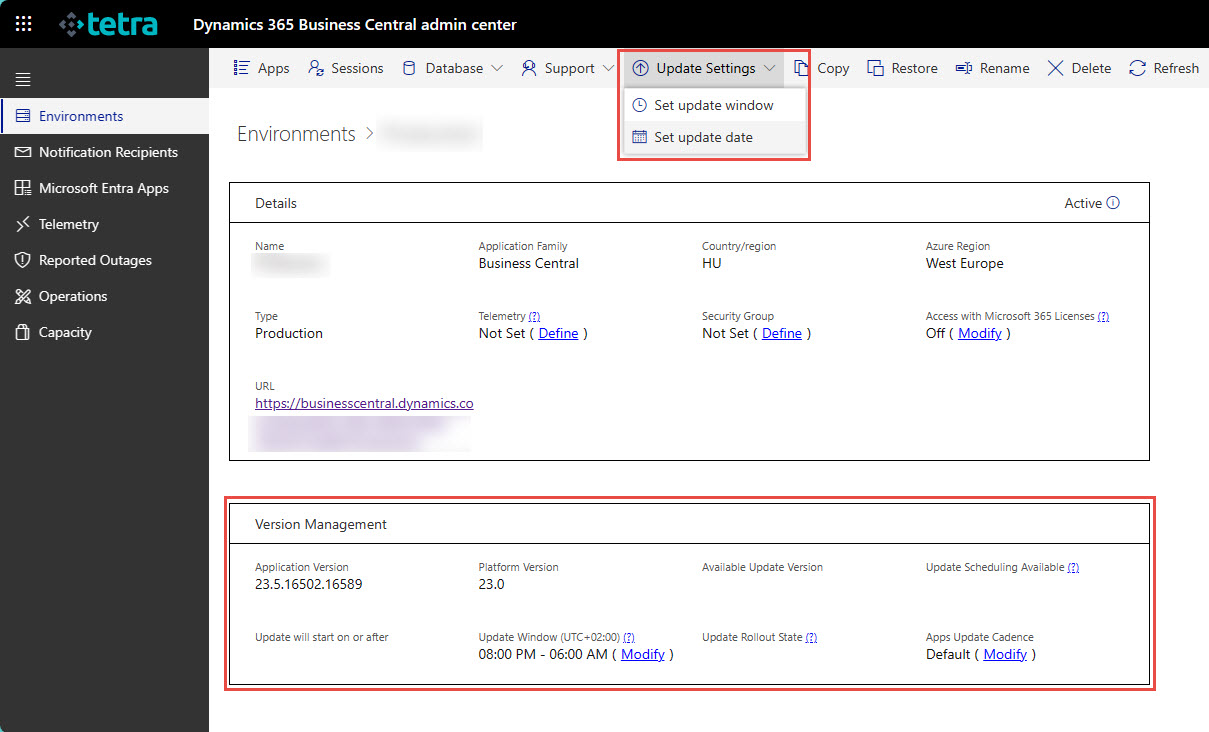
Administrators can set a maintenance window in which Microsoft can update each environment and schedule specific dates for updates. For more information, see Manage updates in the Business Central admin center. Microsoft then schedules business feature updates to be applied during these maintenance periods and dates.
An exception to this type of scheduling is continuous updates to the underlying service. Service components apply to multiple environments, such as all tenants in a region. Therefore, Microsoft schedules these updates for times when traffic is lower in each region, usually in the evening or at night. Users usually don't notice service updates. Business Central manages the traffic so that it does not affect the people working in the Business Center.
Life Cycle Policy
Business Central Online is subject to Microsoft's modern lifecycle policy, which means continuous service updates and major updates every six months.
Tags
We are proud to work with them


 2089 Telki, Öreghegyi út 31/A Hungary
 +36 30 502 0648